Triple Battery
Hardware requirement~
Triple-Battery, much like Double-Battery, requires a dedicated CAN channel for each battery.
At the moment the following 3-CAN boards are compatible:
- LilyGo T-2CAN with MCP2518FD add-on
- Connect Battery1 to CAN-A
- Connect Battery2 to CAN-B
- Connect Battery3 to MCP2518FD
- Connect Inverter to Modbus, RS485 or CAN-A (shared with battery1)
- BECom
How does parallel operation work?~
The batteries get connected in parallel. This means the voltage stays the same, but the capacity triples.
IMPORTANT
The batteries need to be of the same model and size, and preferably as close as possible in state of health. Do not connect battery packs with too much variation in condition, this lowers overall efficiency significantly!
CAUTION
Do not connect packs in series!
- How to ensure balancing, that each battery reaches 100%? In parallel operation this is easy, in series it's next to impossible.
- There are no safeties implemented for operation in series connection! No control over CAN controlled contactors would make this feature hard to use safely.
- None of the isolation is designed for double the working voltage. Yes, each battery only sees it's own voltage, but the isolation to earth and in the BMS comms suddenly sees twice. As do any internal contactors, which is probably the more immediate issue.
Which batteries are compatible?~
The list below is generated from battery_supports_triple() in Software/src/battery/BATTERIES.cpp. Only these integrations offer the "Triple battery" option in the Settings page. The ones with a checkmark have been confirmed working well.
- CMFA platform (Dacia Spring, Renault K-ZE)
- Nissan LEAF / e-NV200 24/30/40/62kWh ✅
- Relion LV
- Stellantis ECMP
- Fake battery for testing purposes (no hardware needed, useful for trying out a triple setup)
All of these are also compatible with Double Battery.
GPIO controlled contactors~
For batteries that require externally controlled contactors, you can automate this by enabling:
- Battery1 - Contactor control via GPIO: ✅
- Battery2 - Double-Battery Contactor control via GPIO: ✅
- Battery3 - Triple-Battery Contactor control via GPIO: ✅
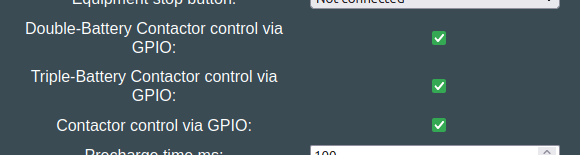
This will start with connecting battery1, then once voltages match, battery2 and battery3 joins the DC link when voltages are close enough to first battery.
See the HAL pin definitions for your hardware, to see which pin actuates the extra contactor set.
CAUTION
Working with high voltage is dangerous. Always follow local laws and regulations regarding high voltage work. If you are unsure about the rules in your country, consult a licensed electrician for more information.