EMUS G1
The Battery-Emulator is compatible with the EMus G1 BMS. With this BMS you can construct your own high voltage battery, and connect the BMS via CAN to the Battery-Emulator. This allows you to use a DIY battery (instead of an EV battery) with any normal Battery-Emulator compatible inverter.
Where do I get the hardware?~
Setup~
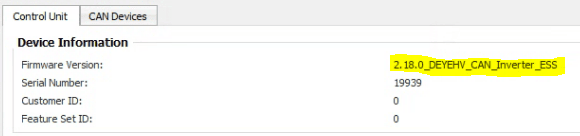
Emus G1 BMS needs to be configured to emulate Deye_hv_can inverter protocol.
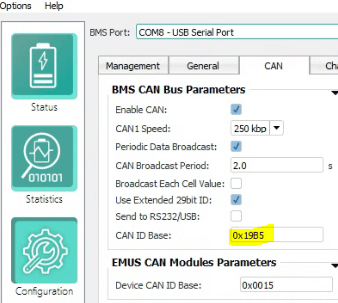
Set CAN ID base to 0x19B5
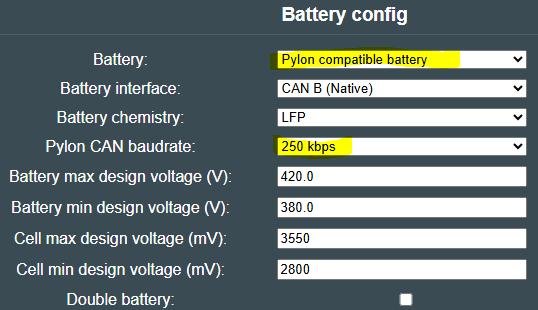
Set Battery type to Pylon and baud rate to 250
Battery Emulator will show all needed information and also populate cellmonitor page with individual cell voltages and if they are balancing or not.
Contactor control. The EMUS system when powered on, will automatically close battery contactors if it is plugged in to a CAN line. This can sometime be a problem if you do not want the battery live to the inverter.
The EMUS system has a 12v 'ignition switch' input to control the contactors from an external source. This can be connected through a relay from the Lilygo/Stark contactor control outputs on its GPIO. By switching 12v using a relay, you can then have the battery emulator/ inverter control the contactors. The EMUS system will still prevent the contactors opening if it is in a fault state to prevent damage to the battery.
It is also highly recommended to use a separate CAN line for the inverter, so use a Stark or Lilygo T 2-CAN.
CAUTION
Working with high voltage is dangerous. Always follow local laws and regulations regarding high voltage work. If you are unsure about the rules in your country, consult a licensed electrician for more information.