Cellpower
The Battery-Emulator is compatible with Cellpower BMS, used on Intercel CLPL batteries.
Configuration~
IMPORTANT
The Cellpower BMS runs at 250kbps CAN speed. Due to this it cannot be connected to same CAN bus as solar inverters.
Start by connecting the CAN port of the BMS, to the Native CAN port on the Battery-Emulator.
- If you have a Modbus inverter, connect it to the RS485 port of the Battery-Emulator
- If you have a CAN inverter, you need to connect it to a separate 500kbps CAN channel, since the BMS runs at 250kbps
- choose an Emulator board which has more CAN channels like LilyGO T-2CAN, BECom, Stark CMR
- add a separate MCP2518 CANFD channel
Software configuration~
For this battery type, use the option called "Cellpower BMS" under the "Battery Protocol" setting. Also make sure to configure the interface to Native CAN.
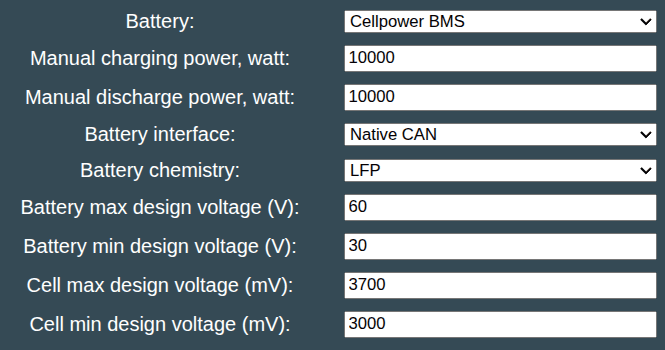
Also remember to configure all battery limits to suite the battery you are using!
CAUTION
Working with high voltage is dangerous. Always follow local laws and regulations regarding high voltage work. If you are unsure about the rules in your country, consult a licensed electrician for more information.